Why Is My Laptop Fan Making A Buzzing Noise?
You’re minding your business, working on your laptop, when suddenly — buzzzzzzzz. It’s not a subtle hum or a polite whirr anymore. No, it’s a full-on mechanical protest, loud enough to turn heads across the room.
If your laptop fan sounds like it’s auditioning for a role in a disaster movie, it’s time to listen up. Buzzing, grinding, and other strange noises aren’t just random quirks — they’re warning signals. Let’s break it all down, piece by piece.
Laptop Makes Buzzing Noise When Turned On
If your laptop greets you with a loud buzzing noise the moment you turn it on, that’s usually a flashing red flag for internal trouble. Here’s why:
Dust Invasion: Over time, dust accumulates inside your laptop, especially around the fan and vents. It clogs airflow pathways, forces the fan to work harder, and sometimes causes the blades to scrape against debris, creating a noticeable buzz.
Loose Components: Screws or brackets inside your laptop might have come loose. When the fan kicks into gear, it vibrates these pieces, leading to an irritating buzz.
Fan Damage: If the fan itself is cracked, unbalanced, or wearing out, it may generate an uneven, buzzing noise right from start-up.
At this stage, the noise is basically your laptop whispering (or shouting) for maintenance before things get worse.
Recommended Products:
- Spogie 11-in-1 Keyboard Cleaning Kit
This comprehensive kit includes brushes and tools to effectively clean your laptop’s internal components, helping to eliminate dust that may be causing the buzzing noise. - CRAFNEW Small Cleaning Brush Kit (Set of 22)
A versatile set of brushes designed to clean various electronic devices, ensuring your laptop’s fan and vents are free from debris.
Also Read: How to Fix A Noisy Laptop Fan in 10 EASY Steps
Why Is My Laptop Making A Buzzing Noise?
Let’s zoom out a little. Not every buzzing noise is directly tied to the fan. Some broader causes include:
Hard Drive Issues: Especially if you have an older laptop with a mechanical spinning drive (HDD). As the platters inside wear out, they can produce a low buzzing, grinding, or clicking sound. It’s the auditory equivalent of a hard drive gasping for air.
Electrical Interference: Power problems, whether from faulty chargers, poor wiring, or internal voltage issues, can sometimes create a faint, persistent buzzing sound through speakers or internal parts.
Speaker Glitches: Occasionally, driver errors or hardware faults can cause the speakers to emit a low hum or buzz — not mechanical, but still annoying.
In short: If the buzz persists even when the fans aren’t heavily spinning, it could be another piece of hardware quietly begging for retirement.
Recommended Products:
- Laptop Cooling Pad with 6 Quiet Fans
This cooling pad helps dissipate heat efficiently, reducing the strain on your laptop’s internal fan and potentially eliminating buzzing noises. - ICE COOREL Gaming Laptop Cooling Pad with 8 Fans
Featuring multiple fans and adjustable height settings, this cooling pad enhances airflow and cooling performance.
Laptop Fan Making Grinding Noise
Grinding is buzzing’s meaner, nastier cousin — and it’s almost always bad news.
Common causes:
Debris in the Fan: Tiny particles — dust, hair, crumbs (yes, those late-night snacks catch up to you) — wedge themselves between fan blades, making them scrape or grind against the casing.
Broken Bearings: The fan’s internal bearings allow it to spin smoothly. Once those bearings wear down or crack, the fan starts grinding instead of gliding.
Blade Damage: Cracked or bent fan blades can physically collide with the fan housing, causing a harsh mechanical grinding sound.
Important note: If you hear grinding, the fan isn’t just dirty — it’s probably damaged. Ignoring it can lead to overheating and complete system failure.
Recommended Products:
- Replacement Laptop Fan (Model-Specific)
Ensure compatibility with your laptop model when selecting a replacement fan to restore quiet operation. - Compressed Air Duster
Ideal for removing dust and debris from hard-to-reach areas within your laptop, potentially resolving grinding noises.
Why Is My Laptop Making A Buzzing Noise and Not Working?
Now things are getting serious. If your laptop is buzzing and also not functioning properly, it could point to:
Severe Overheating: A broken or jammed fan means your CPU and GPU can’t cool themselves. Modern laptops often shut down or throttle performance drastically to prevent a meltdown.
Failing Hard Drive: A buzzing hard drive plus system crashes could mean impending data loss. In this case, the drive isn’t just noisy — it’s dying.
Power Supply Problems: In rare cases, internal power supply issues cause both strange sounds and system instability.
In plain English: if it buzzes and misbehaves, stop using it, back up your data, and seek repairs immediately.
Recommended Products:
- External Hard Drive for Data Backup
Safeguard your data by backing it up to an external drive, especially if hardware failure is imminent. - Professional Laptop Repair Services
Consider seeking professional assistance to diagnose and repair hardware issues causing the buzzing noise.
Why Is My Laptop Fan So Loud All of a Sudden?
You’re working quietly and then, out of nowhere, it sounds like your laptop is preparing for lift-off.
Why the sudden roar?
Blocked Air Vents: Even a thin layer of dust can suffocate your laptop’s cooling system, forcing the fan to spin harder and louder.
Background Processes: Some rogue programs or malware running in the background can push your CPU to 100%, forcing the fan into overdrive to cool it down.
Thermal Paste Degradation: Over time, the thermal paste that sits between your CPU and heat sink dries out, making it harder to transfer heat efficiently. Result? Fans work overtime trying to keep temperatures in check.
Pro tip: If your laptop was whisper-quiet yesterday and roaring today, something changed internally, and it deserves attention.
Recommended Products:
- Anker 100W GaN Charger
A high-efficiency charger that reduces heat generation during charging, potentially minimizing fan noise. - Laptop Cooling Pad with Adjustable Fan Speeds
Allows you to control fan speeds to match your laptop’s cooling needs, reducing overall noise.
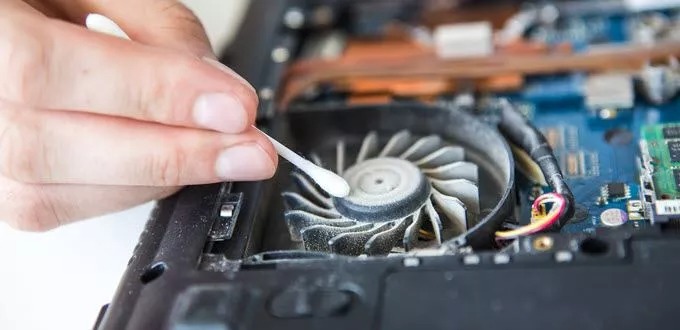
How To Clean Laptop Fan
If you’re feeling brave (and a bit handy), cleaning the fan is one of the best ways to rescue your laptop from the buzzing abyss.
Here’s how to do it safely:
Shut it down completely and unplug all power sources (battery and charger).
Unscrew the back panel carefully. Most laptops just need a small Phillips-head screwdriver.
Hold the fan blades still gently with a plastic tool or a toothpick. Spinning the fan freely while cleaning can generate static electricity — not good.
Blast compressed air through the fan blades and vents. Short bursts, angled properly, are best.
Brush out debris carefully using a small, soft brush or even a cotton swab.
Check and clean vents to ensure proper airflow.
Reassemble and test. Listen for that blissful quiet.
Important: If you’re uncomfortable opening up your laptop, there’s no shame in bringing it to a professional for a deep clean. Better safe than sorry (or statically fried).
Recommended Products:
- Spogie 11-in-1 Keyboard Cleaning Kit
Includes tools specifically designed for cleaning laptop fans and keyboards. - Compressed Air Duster
Effectively removes dust from your laptop’s internal components without disassembly.
Why Is My Laptop Making A Buzzing Noise While Charging?
Charging should be a silent, mundane affair. But if your laptop buzzes when plugged in, it could indicate:
Cheap or Faulty Charger: Poor-quality adapters often cause subtle electrical interference that manifests as an audible buzz.
Power Strain: Charging while running heavy applications can overwork your internal power components, making fans spin harder and parts vibrate audibly.
Motherboard Woes: In rare but serious cases, buzzing while charging could hint at a failing capacitor or power circuit inside the motherboard.
Quick test: Try charging with a different adapter. If the buzzing disappears, congrats — it’s the charger, not the laptop.
Recommended Products:
- Anker 100W GaN Charger
Provides stable power delivery, reducing the likelihood of buzzing noises caused by electrical interference. - High-Quality USB-C Charging Cable
Ensures efficient power transfer and minimizes potential interference during charging.
Laptop Makes Buzzing Noise And Freezes
This is one of the worst combinations you can experience. When a buzzing noise teams up with freezing, it often means:
Hard Drive Failure: The most heartbreaking cause. A dying HDD often buzzes, clicks, or whines before finally seizing up — locking your system in place.
Overheating Shutdowns: A struggling fan can’t cool the internals properly, causing your CPU to overheat and freeze the entire system.
Power Delivery Issues: A failing battery or internal power regulator can produce buzzing and cause the system to stall or freeze unpredictably.
Warning: Freezing after buzzing isn’t something to “monitor for a while.” It’s a five-alarm fire situation. Backup critical files immediately and schedule a repair or replacement plan.
Recommended Products:
- External Hard Drive for Data Backup
Back up important files to prevent data loss in case of hardware failure. - Professional Diagnostic Tools
Useful for identifying hardware issues causing system instability and buzzing noises.
Final Thoughts
A buzzing noise inside your laptop is more than an annoyance — it’s a siren song of incoming doom if left unchecked. From dust build-up to dying fans, failing hard drives, and worn-out chargers, the sources are many, and none should be ignored.
If your laptop starts buzzing, grinding, freezing, or just generally acting possessed, don’t just turn up your music and hope for the best.
Tackle the problem head-on — clean it, replace failing parts, or get it repaired professionally — before you’re left staring at a lifeless black screen wondering what went wrong.
Source: https://www.ifixit.com/products/laptop-cleaning-kit

Meet Mike O’Connor, (a DIY enthusiast), living in Cincinnati, a city ranked as the noisiest in the USA.
As a work from home dad, I have a first hand experience of how noise can truly affect your well being.
Soundproofing isn’t something that should be taken as a hobby, it should be a skill that every homeowner should be equipped with.
Most of the work documented on this blog comes from purely first hand experience, and the products recommended work as indicated.